qbittorrent, linux cli, nordvpn, openvpn, split tunnel!

- Posted in Infrastructure by

I FINALLY got around to properly split tunneling. You know... to get my linux isos

Nothing here is specific to nordvpn. Just an example service.

  • install openvpn
  • Create /etc/openvpn/nordvpn.auth with permissions of root:root 440 (I think these permissions work lol, TODO: verify it works)
ServiceUsernameHere
ServicePasswordHere
  • Download openvpn config file from nordvpn and put into /etc/openvpn/
  • Rename to .ovpn to .conf. ex: /etc/openvpn/pt1234.nordvpn.udp.conf
  • edit to not be full tunnel:
    • add route-nopull
    • add auth-nocache
    • change auth-user-pass nordvpn.auth
  • Start service with sudo systemctl start [email protected] (dont add .conf)
    • ex: sudo systemctl start [email protected]
    • note: sudo service start will not work! service doesn't take params like the @
  • check if it working with sudo journalctl -xeu [email protected]
  • Make it stay on reboot with sudo systemctl enable [email protected]

Note:

  • sudo systemctl restart [email protected] DOES NOT WORK! You must do STOP and then START.
  • I believe the openvpn service will just control all .conf files it finds in the directory. Which means that just placing a .conf there will create/run that tunnel. Rename unused tunnels with a .off or something.

actual todo: look into doing wireguard instead. apparently you can use the nordvpn official program and extract the config file from nordlynx

changelog: 2023-07-10 added split tunnel lines, auth file permissions, openvpn service note, small formatting

Road to Advanced Networking: Part 3 - WiFi upgrading

- Posted in Infrastructure by

What to replace

I have an UniFi AP AC LR loaded with Openwrt. Why Openwrt? Because I'm not paying for planned obsolescence, crippleware, or worst of all cloud connected infrastructure. Also at the time, I didn't know too much about Ubiquiti. Overall however, it has been great. I got 50% more coverage over the ISP router and more control. I had some backyard coverage, was fine in the garage, and fine for most of the bedrooms.

Fast-forward 5? years and there is just too much noise. Everything in the world runs on 2.4ghz. It's passable in the high traffic areas and borderline useless in the bedrooms. The Steam Deck is really unhappy with it. Seems like the wifi on the Deck is actually on the weaker side. It's unstable in bedroom, around 1mb/s peak? averaging 500-2kb/s. In my computer room, the 2.4ghz is faster than the 5ghz because of the signal strength.

I took a quick look at Zyxel but it just wasn't ready for Openwrt at the time of purchase. Instead, I got a UniFi 6 LR since it did 4x4 wifi 6/ax and fully supported in Openwrt.

New AP

Alllrighhtttt! Shiny box, Cool self explanatory mount INSERT PICTURE HERE, aaaand oh. It requires POE+ NOOOOOooo

The AP-AC-LR was just POE and was fine but the only open injector I have is 15 watts. This thing wants at least 24 watts.


There is so much happening and im low in energy to have full narrative, doing a outline for now (maybe forever for how long this is)

  • receive injector
  • awesome mount with all the mounting points and labeled.
  • turn on, but can't ssh because i don't know the address! got it all setup as AP, didn't need cloud. was able to setup via phone and do its job
  • openwrt says to use arp to find address but that didn't work, next time just use nmap -sn 192.168.1.0/24
  • used router to find what ip it was, connected via ssh, flashed open wrt OMFG WRONG IMAGE!!! i did sysupgrade image, not the first time install image!
  • tried recovery mode, instructions are WRONG! and inconsistent,
  • instructions say to plug in data while holding reset but also talks about multiple ports. kidna suggests its already on?
  • anyways, hold reset, power on, special pattern
  • guide says 192.168.1.20
  • NOPE no one there, online forums and nmap says 192.168.1.32
  • frustrating!! my pc on windows found it via nmap but does not TFTP !?!?
  • was ready to call it bricked and go for serial recovery. heatgun and effort did not budge it at all
  • cant use acetone on the adhesive because the plastic seems to be ABS or similar
  • realized i didn't try manjaro via the newly discovered ip
  • pc on manjaro does not properly recognize the usb ethernet adapter
  • laptop on manjaro does not nmap or properly set ip address after the first time i used it
  • laptop able to send over TFTP no problem! -_- OK
  • flash, doesn't properly work?? app doesn't find
  • AP is in "waiting for adoption"
  • nmap on pc/windows says it is on 192.168.1.20... HUH WTF
  • ubiquiti needs to put in their documentation, if < x version, 192.168.1.32. greater = 192.168.1.20.... IDIOTS!
  • still can't adopt but now i can ssh with ubnt:ubnt
  • .... now gonna load openwrt with the correct image this time (:

Road to Advanced Networking: Part 2 - Starting the Router

- Posted in Infrastructure by

Problem

A while back I saw a few articles talking about how many consumer routers don't hit gigabit speeds. Seemed like either putting in for a $200+ consumer router or making your own was the way to go. Interesting.

My Ubiquiti EdgeRouter X was pretty cheap honestly and it does more than your typical consumer router at the time that I got it. I have Openwrt loaded on it and at the moment it does some VLANs, Adblocking, dynamic DNS, VPN, and traffic shaping. The two important ones here are VPN and traffic shaping. VPN requires the use of a beefier CPU or one with encryption extensions built-in. However, IIRC Wireguard won't benefit from AES-NI while OpenVPN will so it depends what is used. Traffic shaping just takes CPU and I've read somewhere on the Openwrt forum that my chipset will cap out about 300-600mb/s because of it. It is needed because of buffer-bloat issues so I can't really not have it. My ping times consistency certainly has gotten much better with it on. The best part is that mumble and games aren't slowed when downloading things off of Steam or other large transfers that don't depend on latency.

Candidates

For a long time I've been eyeing a Mikrotik RB5009G. WOW it's cool!.

  • 4 routers fit in 1U rack
  • passively cooled
  • 1x SFP+ 10g
  • 1x RJ45 2.5g
  • 7x RJ45 1g
  • 1 USB3
  • 3 ways to power
  • Marvell Armada Quad-core ARMv8 1.4 GHz CPU
  • 1gb ram and 1gb nand

In addition, it was gaining support in Openwrt to some degree. I was holding out on confirmation that it would get an official build but mostly for confirmation that SFP+ and the 2.5g port works. It also costs $220.

At the same time I was looking at some x86 based routers like the ones from Protectli or Topton via Aliexpress. I was super close to pulling the trigger on the Topton unit. After I waited for a sale and did one more round of checking, I found someone on the ServeTheHome forums saying that their unit turned out to have an engineering sample CPU! The ones who has ES CPUs were having stability issues and one even found uncleaned flux all over the place inside. One person got ghosted by support until they went to Aliexpress to complain. No thanks screw Topton. Protectli just feels a bit too expensive for what I'm getting.

Winner!

Luckily I found the the AOC-STGN-I2S Rev 2.0 on ebay for $50! WHAT! Wait a second, I need this in one of my PCs anyways to validate the higher speeds. For $50 I can also just add it to some old PC and make that into a router! What a no-brainer. Also 10gig RJ45 transcievers are EXPENSIVE! 3.5x price at FS compared to fiber and also consumes much more power which adds up fast in a many port device.

The total damage:

  • $20 ea - 2x SFP+ fiber transceivers from FS.com
  • $4.30 1m OM4 cable from FS.com
  • $6 ea - 2x full height brackets from eBay
  • $50 ea - 2x AOC-STGN-I2S Rev 2.0 from eBay

so kewl, such fiber, much spede, still upgradable, many lerning

The Routers

I have two old systems to play with

System 1:

  • A6-7400k
  • 2 x 4gb DDR3 1600
  • Asrock A88M-G/3.1 (micro-atx)

System 2:

  • A6-6400k
  • 2 x 2gb DDR3 1333
  • Gigabyte GA-F2A58M-HD2 (mini-itx)

To keep writing later:


Broken Booting

  • Tried to boot into Opnsense, instant reset
  • in safe mode, gets to installer but upon configuring drive, reset
  • manjaro, reset. mess with some settings, reset on accessing desktop for 3 seconds
  • trouble with posting, experience with nao's, ty level1forums, bad PSU, also bad handling of USB and net boot

Results

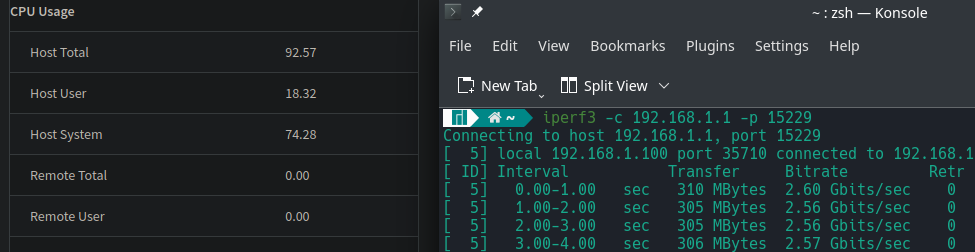
  • Speed testing with A6-6400k hitting 2.6 gb/s iperf3 A6-6400k hitting 2.6 gb/s
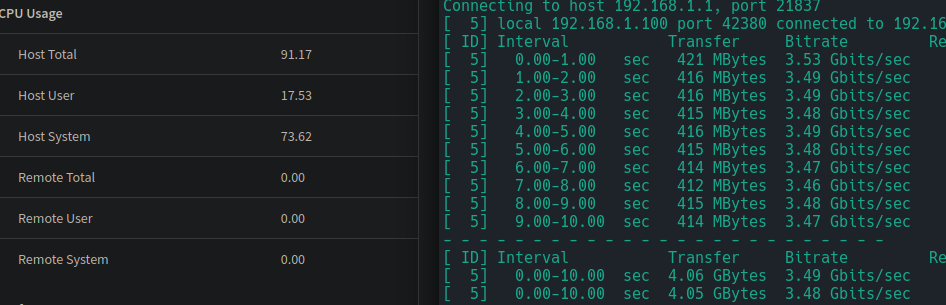
  • Speed testing with A7-7400k hitting 3.5gb/s iperf3 A6-7400k hitting 3.53 gb/s
  • note: this is a HOT! card. It is a server card so it is supposed to have generous airflow across it. I need to take a temp check but it almost burned me. I have a spare 80mm fan leaning against it for now and I hope that the one in my main workstation is ok.

Side note: windows vs linux handling of devices

I'm not sure why but in Windows, when a USB device changes such as plugging in or unplugging, it has a tendency to cause a full system freeze. I'm wondering now as I'm typing this that maybe its an AMD thing? And by freeze I mean a split second hang and that it gets worse for more complicated devices. Flashdrives don't seem to do it, but some headsets do. This problem doesn't happen in Linux at all so I don't think its an AMD thing.

What I noticed that it happens when the link state changes on this network card! When I turn off the router, the link goes to "unplugged" but it hangs for about 3 seconds! Once again, doesn't happen in linux.
Road to Advanced Networking: Part 1 - Planning?

- Posted in Infrastructure by

I've finally begun my trek into some more advanced networking. I've already started this a bit but it's time to commit to the more fun stuff.

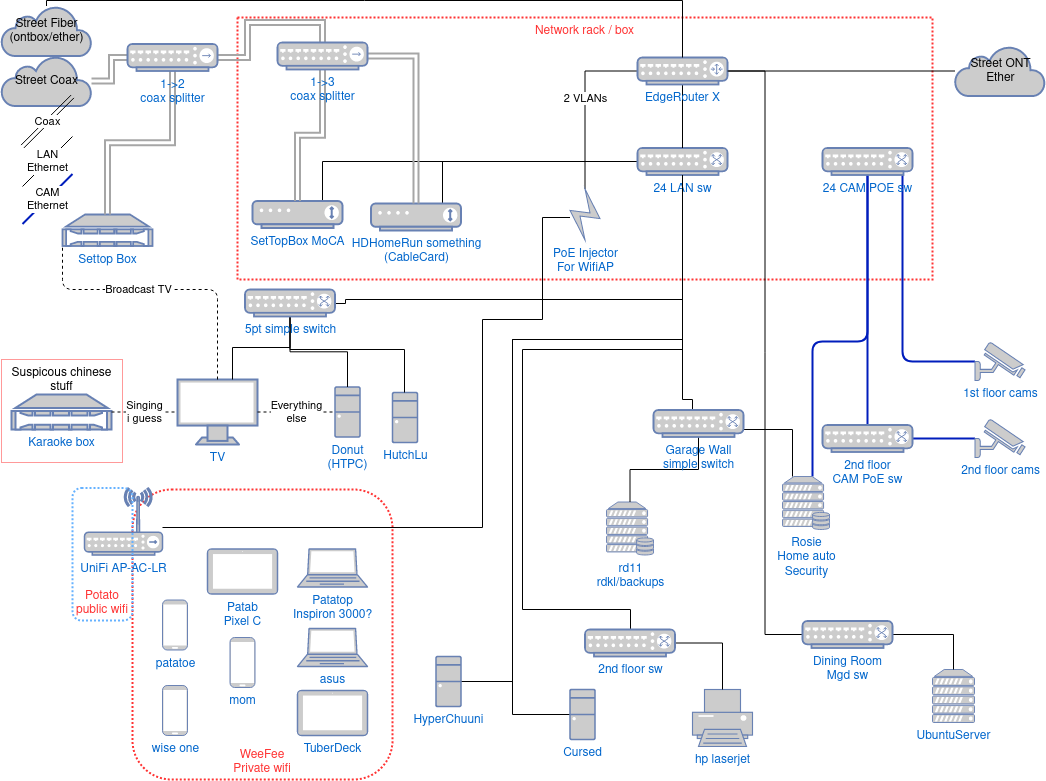
Here is my current stuff: Have a terribly messy old diagram that I never bothered to redo yet. network diagram Sept 2022

  • Edgerouter X running Openwrt
  • unifi running Openwrt
  • mikrotik 5 port managed switch
  • lots of simple switches
  • 3 servers
  • 4 clients
  • 4-5 wireless clients
  • POE cams
  • a headache of networking

Why the separated switches

My dad has this belief that all of the IP cam traffic will congest the network and be in the way. Makes sense especially since we weren't going to get enterprise grade switches at the time. So we separated it into two different physical networks. What I failed to realize was that due to the crappiness of the cameras and the NVR's ability to process things, the cameras are running at ok bitrates, low framerate, 'good' resolution (which I think is upscaled imo). At the moment, the cameras we have only take up a whopping 1.5MB/s! We are supposed to actually have double the cameras and I hate the terrible quality it is outputting now. Hooray for cheap amazon cameras.

The security on these things are so bad that the separated physical networks worked in our favor anyways since I didn't support VLANs at the time. I had it in my head to be outputting about 10MB/s per camera and not 200-500KB/s but of course I never really did any math at the time. I'll have to do a separate post on just the cameras alone at some point.

How it is now

Over the years, any time we were wiring to new places we installed CAT6 and at some point switched to CAT6A when the prices got cheap and ran out of CAT6. However, with all of the stuff I've learned over the years, I wish I ran conduit everywhere, CAT6A, and OM4 to infrastructure points. To be fair, prices have changed a lot since I installed my first cable in the wall so my only real regret is conduit.

WiFi is a bit of a problem. There is just so much noise even a suburban area. Everywhere where I actually want WiFi, its good for about half of the room and the other half gets spotty. anywhere in the yard is unusable. Interesting since when I originally got it, it was perfect for a good part of the yard as well so I don't know if it degraded but I really just suspect background noise. It's time to move to multiple access points.

My largest regret is really making the convergence point in the garage which is just too hot. Which spawned the 'netbox' project of basically making a fridge. At least I learned a lot of really cool stuff from that project like electronics, signalling, pcb design, etc.

The plan

I want to clean it all up! Here's what I want out of everything.

  • 10gig ready
  • Conduit for all infrastructure points
  • move 2nd floor networking from attic to closet
  • 10gig/fiber to critical infrastructure points (between switches)
  • 2.5g+ to servers
  • router move to opnsense
  • Managed switches with VLANs
  • Better wifi coverage across the entire property
  • various VPN things

Nice to haves

  • CAT6A + fiber to all drops
  • Conduit to all drops